
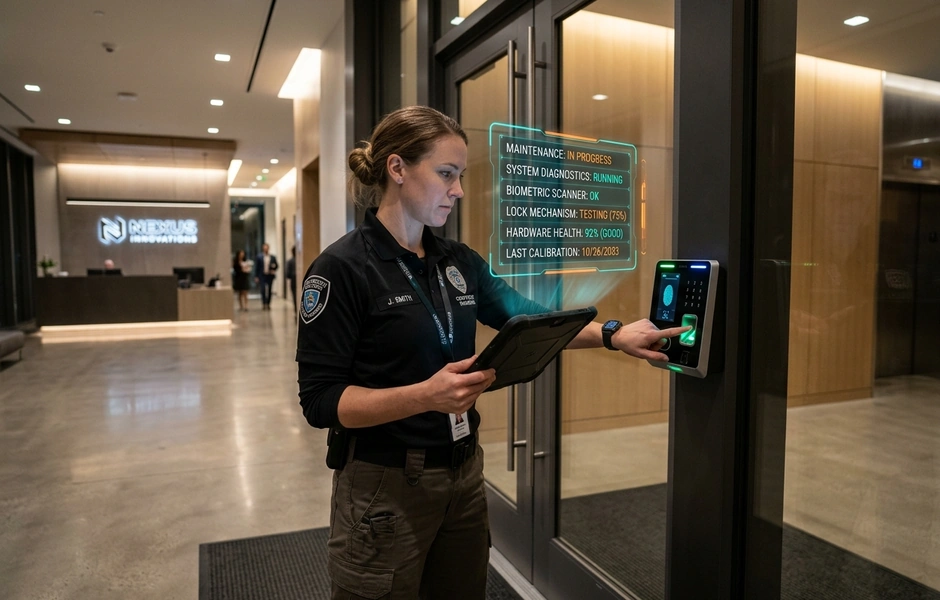
Many enterprises buy advanced lock tools but neglect daily care. Over time, wear and tear leads to reader bugs, door failures, and key errors. These minor issues quickly grow into major gaps and operational issues.
Routine hardware and software patches keep your setup compliant, strong, and ready for quick action.
What this means for you is continuous protection and peace of mind. Taking a proactive path protects your investment, secures your borders, and keeps work smooth. It is always easier to prevent a breach than to recover from one.
Why is routine maintenance important?
Site breaches are rising. Sixty percent of surveyed companies recently reported breaches due to infrastructure lapses. When your system fails, your entire site is exposed. Small glitches and old software quickly turn into invitations for rogue entry. This puts your assets, data, and staff at risk.
Surveys indicate that consistent access control maintenance reduces operational downtime by 45%. This keeps your hardware and software working together. By using a routine checks sheet, you can address gaps before they turn into costly failures. This simple habit keeps your business secure.
| Metric | Proactive Care | Reactive Path | Business Impact |
| Security Breaches | Prevents bad gaps and rogue entry. | Fixes issues only after a breach. | Protects assets and stops breaches. |
| System Reliability | Uses regular checks to find bugs. | Relies on fixing sporadic bugs. | Cuts down unexpected stops. |
| Financial Cost | Low fees starting from thirty dollars monthly. | High emergency repair fees. | Lowers total cost. |
| Compliance | Keeps detailed logs of updates. | Lacks history for inspectors. | Avoids fines and legal issues. |
What This Means for You
Routine checks help spot hardware gaps and software bugs early. This proactive path ensures long-term reliability. It also helps you comply with regional building, occupant, and industry rules.
In the end, consistent care lowers your total cost. You avoid emergency repair fees and keep your site secure. Partner with a certified enterprise to protect your investments and secure your peace of mind. Taking action today prevents costly disasters tomorrow.
What Should a Lock Maintenance List Include?
Physical locks wear down silently. A single faulty reader or a dead backup battery can leave your site open to risks. You might not notice the issue until a rogue guest walks right through a failed door. By then, a costly breach has already occurred.
Studies show that a regular access control maintenance checklist lowers security incident risks by 40%. This keeps your hardware reliable and ensures your software remains secure against modern threats.
Without a clear plan, teams often overlook minor bugs. A broad list ensures that every unit gets the right care.
How Do You Keep Your Entry Points Secure?
To keep your system running smoothly, your routine should cover these ten steps:
- Visual checks: Check keypads, screens, panels, and wiring. Look for physical damage or signs of tampering.
- Battery checks: Test both active and backup battery health. This prevents power loss during unexpected outages.
- Verify network links: Examine Ethernet cables, wireless links, and ports. Solid links prevent offline errors.
- Inspect voltage level: Use meters to check electric locks and controllers. Ensure they receive the exact power level needed.
- Conduct key testing: Test active cards, fobs, and smart keys. Verify that readers scan and grant entry without delay.
- Review software: Install software patches regularly. Keeping software current maintains compatibility across tools.
- Check electric locks: Verify that locks operate swiftly. Doors must lock and unlock without friction.
- Test fire response: Trigger mock emergencies. Ensure fail-secure doors unlock to allow quick evacuation.
- Review backup logs: Check your emergency plans. Verify that they align with your current site rules.
- Keep detailed logs: Document check dates, findings, and repairs. Clear logs help you prove compliance during inspections.
What This Means for You
Consistent maintenance protects your staff, assets, and reputation. Skipping these steps leads to unexpected stops and open doors. Regular checks turn potential system failures into simple, predictable tasks.
Are you ready to secure your site? Book a free on-site check with our experienced specialists today to keep your business secure.
How Do You Create a Maintenance Schedule?
An unmaintained security system is a disaster waiting to happen. If you neglect your hardware, minor glitches can turn into major breaches. This leaves your site open to rogue entry.
Reports show that proactive access control system maintenance reduces sudden hardware failures by 35%. By setting clear intervals, you keep your system reliable and secure.
First, list all your devices. Note their locations, installation dates, and models. Next, define your check intervals. These should range from simple daily checks to professional annual audits. Finally, assign clear tasks to your staff and partners.
| Frequency | Key Tasks | Responsible Party | Target Outcome |
| Daily | Conduct visual and door checks | On-site security teams | Spot physical wear or tampering |
| Monthly | Inspect hardware and test locks | On-site security team | Ensure locks and readers work well |
| Annually | Perform full system audits | Certified integrators | Maintain compliance and efficiency |
| As Needed | Execute troubleshooting and updates | Certified integrators or IT staff | Fix active bugs and patch software |
What This Means for You
A proactive schedule cuts system downtime and lowers repair costs. It helps you stay ahead of gaps. You can rely on professional care to keep your facility secure.
Why Do Compliance and Digital Protection Matter?
Physical locks are no longer your only risk. A single unpatched software bug can expose your entire network to digital threats and costly compliance fines.
Integrating digital defense into your routine maintenance solves this risk.
| Legacy maintenance | Modern maintenance |
| Focuses only on physical wear | Prioritizes cybersecurity and compliance |
| Reactive repairs | Proactive digital and physical updates |
Keep your site secure by addressing these key areas:
- Adhere to Global Standards: Ensure all hardware and software updates comply with rules like NDAA, GDPR, and SIRA.
- Build Cyber Defenses: Protect your software with strict digital safeguards.
- Prevent Security Gaps: Minimize downtime by running structured backup plans.
- Invest in Reliability: Choose enterprise-grade hardware designed for continuous use with high MTBF.
What This Means for You
Secure maintenance protects your physical doors and your digital network. It reduces liability and keeps operations seamless. Reach out to our team today to protect your site.
Frequently Asked Questions
Does maintenance require help from a certified integrator?
On-site security teams can easily perform basic visual checks on your readers and locks. However, hiring a certified integrator is highly recommended for complex technical tasks. These professionals ensure your system complies with building codes. They also manage critical software updates and verify that your hardware performs reliably. Professional care helps prevent security gaps and keeps your facility secure. Partnering with experts ensures long-term success.
How much do maintenance services cost?
The overall cost depends on site size and device count. Remote software maintenance often starts at low monthly rates for basic updates. For larger properties, full on-site checks usually require annual service contracts. These agreements vary in price based on your specific hardware needs and labor costs. Investing in regular maintenance prevents expensive emergency repairs and downtime. Budgeting for these services protects your investment.
How often should an inspection be conducted?
You should schedule professional inspections at least once a year to ensure system health. Meanwhile, your on-site team must perform daily or monthly visual checks. Testing doors, readers, and backup batteries regularly helps identify damage early. This combined path keeps your setup operating at peak performance. Routine checks prevent minor hardware issues from turning into major failures. Consistent monitoring is key to maintaining site protection.
What records are necessary for compliance?
To meet strict standards, you must keep detailed records of all system activities. Always log your initial installations and any subsequent hardware repairs. You should also document software patches and the results of emergency fail-safe testing. Keeping track of guest actions and user permissions is equally important. These organized logs prove your site remains secure during official inspections. Clear logs also help technicians troubleshoot future issues quickly.
Why Is Routine Maintenance Essential?
Neglected systems fail when you need them most. Using a maintenance list transforms lock systems from a passive investment into a strategic advantage. Routine maintenance ensures your hardware remains highly reliable, compliant, and linked.
What This Means for You
Partner with trusted advisors to protect your site. Keep your operations seamless, secure, and ready for any threat.
Conclusion
Neglecting your hardware leads to system failures and costly breaches. Regular maintenance keeps your site secure and compliant. By using a structured checks sheet, you can find hardware vulnerabilities and software bugs early. This proactive path ensures long-term reliability and lowers your total cost.
Do not wait for a major gap to occur and disrupt your critical daily business operations. The most practical next step is to establish a routine schedule. Partner with a certified professional to conduct thorough audits and keep your software updated. Taking action today protects your assets, secures your perimeter, and gives you total peace of mind.